Create Free Account

Mobile Apps

Two Free Apps. Sign In at the Gate. Inspect With No Signal.

Live Access signs a Worker in, checks them at the gate, and shows the supervisor who is inside. Inspection runs the checklist where there is no signal. Both native on iOS and Android, both free to the people who use them.

  • Site Supervisors
  • Contractors
  • Safety & HSE
  • Facilities
  • Inspectors
Free on the App Store and Google Play; one install serves every Client on ComplyFlow

What the Mobile Apps Do.

ComplyFlow’s mobile apps put the compliance record in the pocket of everyone on site. Live Access signs a Worker in at the gate, checks them, and shows the supervisor who is inside. Inspection runs checklists offline and syncs when the signal returns. Both are native, both free.

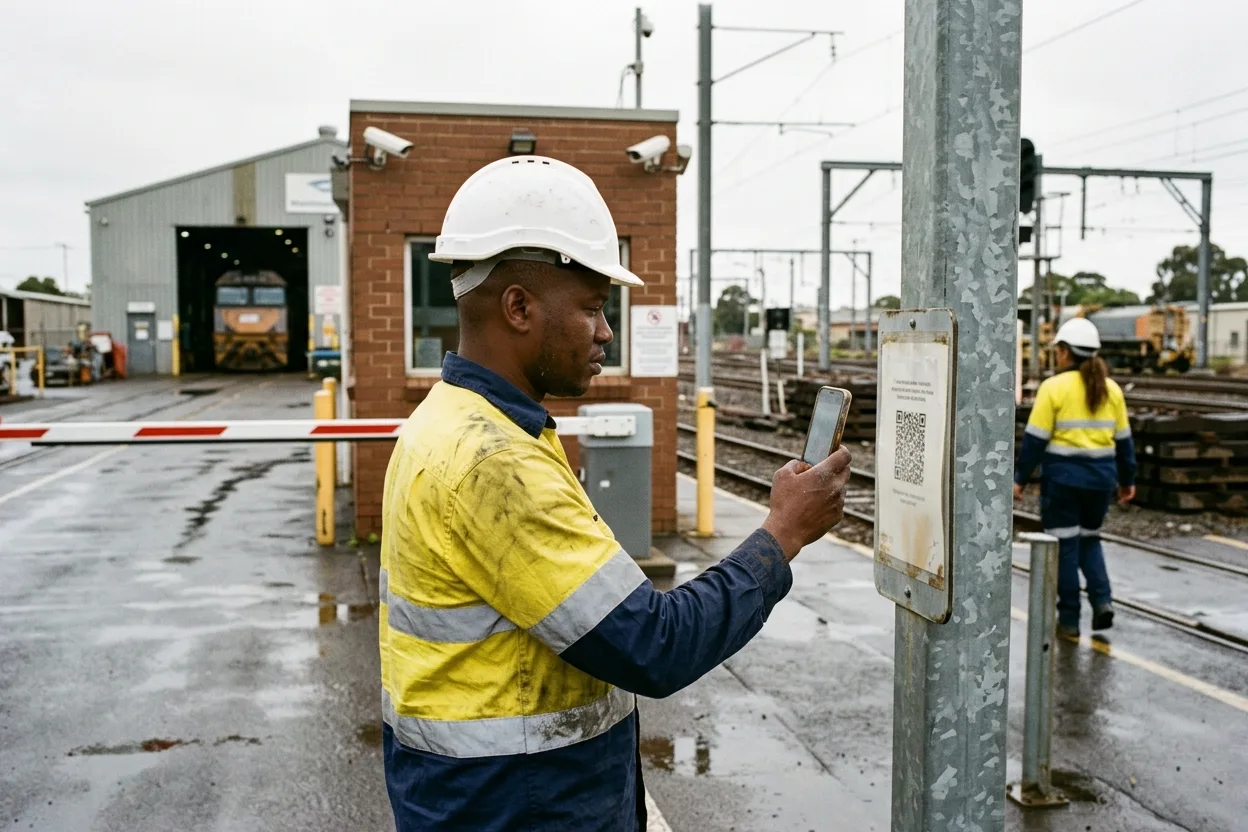
  • Live Access signs people in and checks them. Scan the QR code at the gate; the app reads induction, licences, and permit against the record and logs the site rules shown.
  • It shows the supervisor who is on site. Map and list of everyone inside, permits to approve, Workers to sign in or out, a lone Worker’s time on site.
  • Inspection runs the checklist offline. Templates, photos, and actions captured with no signal, synced when it returns.
  • A kiosk turns any tablet into reception. Visitors sign in by mobile number and the host is told they are here.
A contractor in hi-vis at a rail depot gate scanning a QR code on a post with his phone, the screen soft, with a boom gate and a maintenance shed behind

The Apps

Two Apps. Every Screen Built for a Thumb.

Live Access for everyone who walks onto a site. Inspection for everyone who checks one.

  • Live Access

    Cleared at the Scan

    One word after the QR code, then the induction, licence, and insurance the word rests on.

  • Live Access

    Who Is on Site, Now

    The supervisor’s list, one red flag, and one button that messages everyone inside.

  • Inspection

    Tick, Cross, or N/A, Offline

    The checklist works with no signal and syncs when the device comes back up.

  • Live Access

    Nobody Alone Is Forgotten

    A countdown the supervisor can see, and an Emergency button that reaches somebody.

  • Live Access Download on the App Store Get it on Google Play
  • Inspection Download on the App Store Get it on Google Play

Free on the App Store and Google Play.

Both apps work with a ComplyFlow account, which a contractor’s Client or employer provides. One install serves every Client on ComplyFlow.

One Record, Every Device

What the Phone Does, and Where It Lands.

Read it left to right: what happens on a device at the site, the one record it writes to, and what the office and the auditor see.

On the device

A Worker scans the QR code at the gateInduction, licence, insurance, and permit read at the scan Live Access
A supervisor approves a permitFiles, AI review, comment, approve or reject, from the phone Live Access
An inspector works a checklist offlinePhotos and findings held on the device until the signal returns Inspection
A visitor signs in at the kioskMobile number, host, conditions of entry, on a tablet Kiosk
A lone Worker sets their time on siteCountdown, supervisor alerts, Emergency button Live Access
PrequalificationWorkforce ComplianceTraining & InductionSite AccessVisitor Sign-InSite DocumentsDigital PermitsInspections & AuditsPlant & EquipmentIncident ManagementRisk Management ComplyFlow. One Record.

Where it lands

The live list and mapWho is on site, cleared or not, on the web for the office
The sign-in bookEvery sign-in with the rules viewed, exported as PDF
The permit and the work orderApproved on the record, signed in to at the gate
The inspection and its actionsFindings become owned actions on the dashboard the moment they sync
Alerts and answersSupervisor alerted on overrun; your assistant asks the record through MCP MCP

Every screen on this page writes to the same record the office reads. There is no second database on the phone.

What It Covers

Both Apps, Not the Highlights.

Everything below is in the apps today and documented in the Help Centre.

Live Access

Inspection

Kiosk & Checks

Where the Help Centre documents an item, its name links to the article.

How It Works

Four Screens, Four Phones.

The Worker’s own view, the permit approved on the phone, the inspection with no signal, and the visitor at the kiosk.

The Worker Sees Their Own Standing.

A contractor opens Live Access and sees where they are cleared and what expires next, before they drive to site. One install, every Client on ComplyFlow.

  • Cleared or not, per Client site
  • Documents expiring soonest
  • Sign in with the QR code at the gate

The Permit, Approved From the Phone.

The area supervisor sees the permits waiting on them, opens the files and the AI review, adds a comment, and approves or rejects. The applicant is notified and the permit is on the record.

  • For Review filter and search
  • View permit files before deciding
  • Approve or reject with a comment

The Inspection, With No Signal.

Three floors down, the template still opens. Each check is a tick, a cross, or n/a, with a photo where it matters. When the device is back online, Complete & Sync files it and the actions are owned.

  • Templates by site and inspection type
  • Photos and notes on every check
  • Syncs when the signal returns

The Visitor, at a Tablet Instead of a Receptionist.

A dedicated tablet on the counter. The visitor enters their mobile, a number already on the record pre-fills their details, they choose who they are here to see, and the host is emailed and texted.

  • iPad in Guided Access or Android screen pinning
  • Host emailed, and texted where a mobile is on file
  • Sign-out is the same number on the way past

Who It Is For

What the Mobile Apps Mean for Me.

Find your job. The lines under it are what changes in your pocket, not ours.

ComplyFlow Is Already Trusted.

Phones at property, transport, resources, manufacturing, government sites, and more already sign in on ComplyFlow.

  • Toll
  • National Intermodal
  • BlueScope
  • ISPT
  • Maersk
  • NSW Planning, Industry and Environment

Book a Demo

Bring Your Phone. We Will Sign You In to a Site in Front of You.

A 30-minute call with someone who has rolled the apps out to depots, towers, and terminals: your gate, your induction, your kiosk, on a real device.

  • A gate set up for one of your sites, then you signed in
  • A permit approved from the phone, with a comment
  • An inspection run with the signal off, then synced
Talk to Us Instead

No slides, no hard sell. A working session on your own set-up.

Book Your Demo

Thirty minutes, on your own requirements.

Book Demo

The form loads from HubSpot. If it does not appear, the button takes you to the demo request page.

A clipboard with a rain-spotted paper inspection checklist and a pen on the bonnet of a work ute, a phone beside it, a wet civil site behind

How It Stacks Up

Where the Phone Usually Comes In, and What Each Misses.

Most sites use a paper sign-in book and a clipboard, a stand-alone visitor app, or a generic forms app for inspections.

Paper and a clipboardWorks without signal; nobody reads it until something goes wrongA visitor sign-in appSigns the visitor in; checks little about the contractor at the scanA generic forms appCaptures the checklist; the result lives outside the compliance record ComplyFlowOne record, your standard
Checks the Worker against their record at the scan Not therePartlyNot there Induction, licences, insurance, permit, read at the gate
Works with no signal Built inPartlyPartly Inspections offline; synced on return
Findings become owned actions on the same record Not thereNot therePartly Owner, due date, dashboard, all in one place
Supervisor approves permits from the phone Not thereNot thereNot there Files, AI review, comment, approve or reject
Lone Worker time on site and a distress alarm Not thereNot thereNot there ETOS, supervisor alerts, Emergency button
Visitors and contractors on one sign-in Built inPartlyNot there One point, one book, host notified

This compares kinds of product, by how they are sold, not named vendors. Named comparisons, with dates and sources, live on the comparison pages.

Getting Started

We Set It Up With You. We Stay With You.

You are not handed a login and left to it. Our onboarding team sets up your gates, kiosks, and templates, brings your contractors onto the app, and stays on hand once the first scan goes through.

  • Mitch Bourne, ComplyFlow
  • Jessica Morgan, ComplyFlow
  • Sam Bourne, ComplyFlow
  • Phil Wallach, ComplyFlow
  • John McCann, ComplyFlow
  1. 1 We Map Your Sites

    Every gate, every reception, every inspection that happens on a device, and who needs to approve what from where.

  2. 2 We Set Up the Devices

    QR codes for the posts, kiosks locked to the app on dedicated tablets, inspection templates loaded for offline use.

  3. 3 We Bring Your Contractors Across

    Their Workers on Live Access with the induction done, so the first scan clears the people it should and stops the ones it should not.

  4. 4 You Go Live, We Stay Close

    Training for your supervisors and inspectors, a Help Centre for everyone, and a support team that picks up the phone.

  • ISO 27001 certified ISO 27001Certified 2019
  • AWS Qualified Software Certified 2023
  • GDPR, General Data Protection Regulation Compliant 2020
  • Microsoft Okta Single sign-on

Security & Data

Certified, Audited & Hosted in Australia.

Your compliance record is the evidence you rely on when somebody asks, so where it lives and who can reach it matters. ComplyFlow is ISO 27001 certified, runs on AWS in Australia, and your people sign in with the accounts they already have.

Questions

Questions People Ask About the Apps Before a Demo.

Which apps are there, and what does each do?

Two native apps on iOS and Android. ComplyFlow Live Access signs Workers in and out of Client sites, checks them at the gate, and gives supervisors the live list, permits to approve, and lone Worker alerts. ComplyFlow Inspection runs inspection templates on the device, offline if need be, and syncs the findings and actions.

Do contractors have to pay for the app?

No. Both apps are free on the App Store and Google Play. They work with a ComplyFlow account, which the contractor’s Client or employer provides. A contractor uses the same app at every Client on ComplyFlow.

Does the Inspection app really work offline?

Yes. Templates are on the device, checks, photos, and notes are captured without a signal, and the inspection syncs from the Complete & Sync button when the device is back online.

What hardware does the kiosk need?

A dedicated tablet. An iPad in Guided Access or an Android tablet with screen pinning keeps the device on the kiosk screen. Visitors enter a mobile number; a number already on the record pre-fills their details; the host is emailed, and texted where a mobile is on file.

Can a supervisor check a Worker without the app?

Yes. Any phone camera scans the QR code on a Worker’s access card and opens a web page showing Cleared or Not cleared, then the categories, training, and documents behind it. The Live Access app adds the live list, permits, and manage others.

How do staff sign in to the apps?

With their ComplyFlow account. The Inspection app also signs in with a Microsoft account through MSAL, and a staff user can be restricted to single sign-on only.

See It on Your Own Phone.

Book a 30-minute demo. We will set up a gate for one of your sites, sign you in on your own phone, approve a permit, and run an inspection with the signal off. No slides, no hard sell.

  • ISO 27001
  • Hosted on AWS
  • Microsoft & Okta SSO
  • API & MCP
  • Data in Australia

Compliance you can prove, instantly.